
EasyPaste Fast & Lightweight Clipboard Manager for Mac
Keep all your copy history at hand. Save time, paste with hotkeys, and stay 100% private.
curl -O https://easypaste.im/EasyPaste-v10.0.3.dmg
Download with Terminal
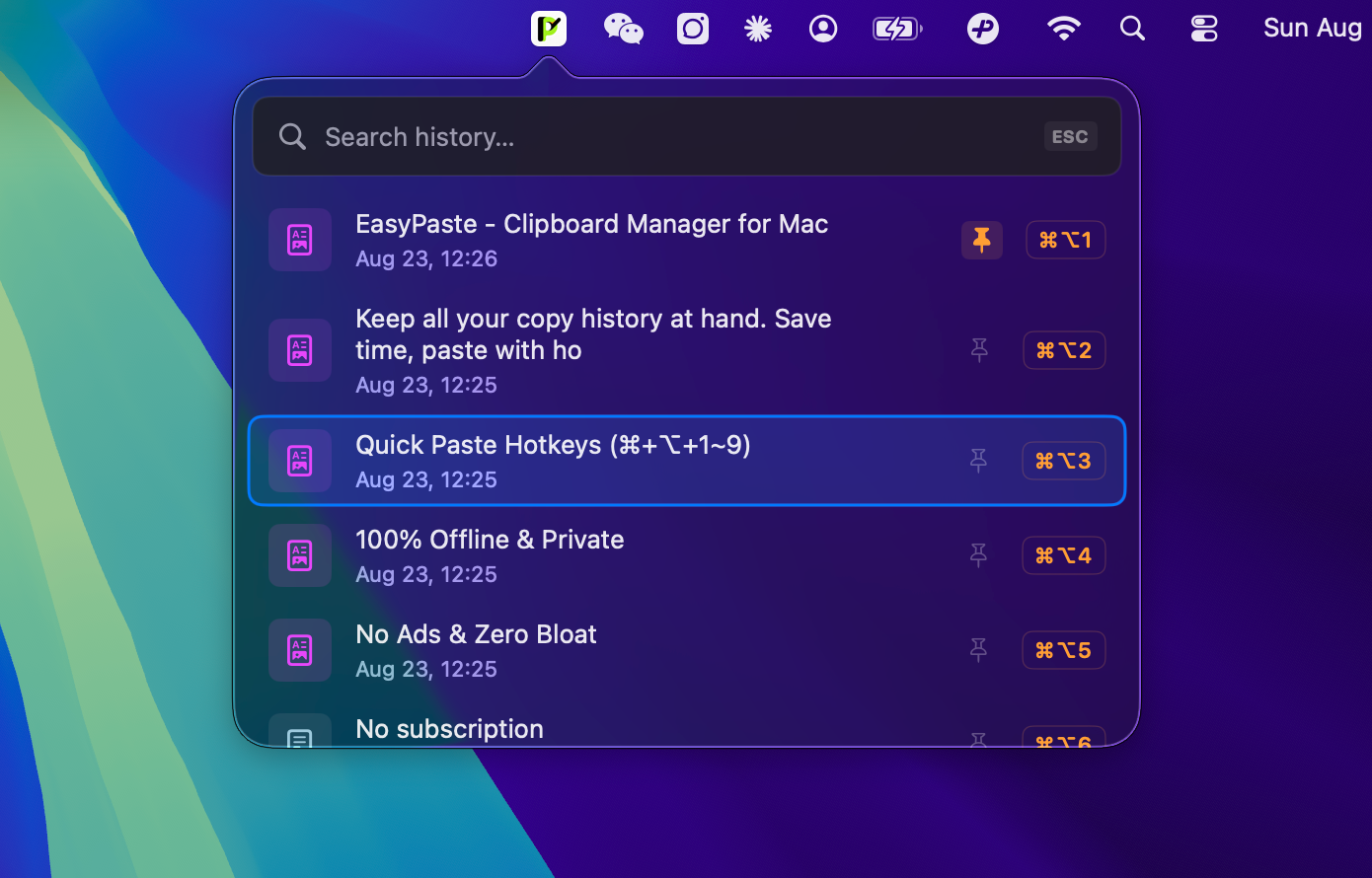
Everything you need in a clipboard tool
Built for fast copy-pasting, keyboard shortcuts, and simple daily productivity.
Direct Paste with Hotkeys
Paste your 1st to 9th recent copies directly into any active app without opening a popup window.
Pin Favorite Clips
Pin essential code snippets, links, or templates to the top. Pinned items stay permanently and are never rotated out.
Fast Real-Time Search
Quickly find what you copied. Supports plain text, formatted rich text, links, and screenshots.
100% Offline & Private
Your data never leaves your computer. Automatically ignores sensitive password manager apps.
Custom Shortcuts
Change your open hotkey and direct paste shortcuts easily in Settings to match your typing habits.
Lightweight & Fast
Built with pure Apple Swift. Runs smoothly with less than 15MB RAM and very low battery drain.
How EasyPaste Compares to Others
See why users choose EasyPaste over other Mac clipboard tools.
| Feature | EasyPaste Fastest | Maccy | Paste App | Raycast / Alfred |
|---|---|---|---|---|
| Direct Paste (No popup) | ✅ ⌘+⌥+1~9 Direct | ❌ (Must open menu) | ❌ (Must open board) | ❌ (Requires search) |
| Pin / Unpin Clips | ✅ ⌘+P / Pin Badge | ✅ Supported | ✅ Pinboards | ⚠️ Snippets system |
| Native App (Swift/SwiftUI) | ✅ Pure Swift (<15MB) | ✅ Pure Swift | ⚠️ High RAM usage | ⚠️ Large multi-tool app |
| Privacy (100% Offline) | ✅ 100% Local (No cloud) | ✅ 100% Local | ⚠️ Cloud sync enabled | ⚠️ Cloud sync options |
| Hide Password Apps | ✅ Built-in list | ✅ Supported | ✅ Supported | ✅ Supported |
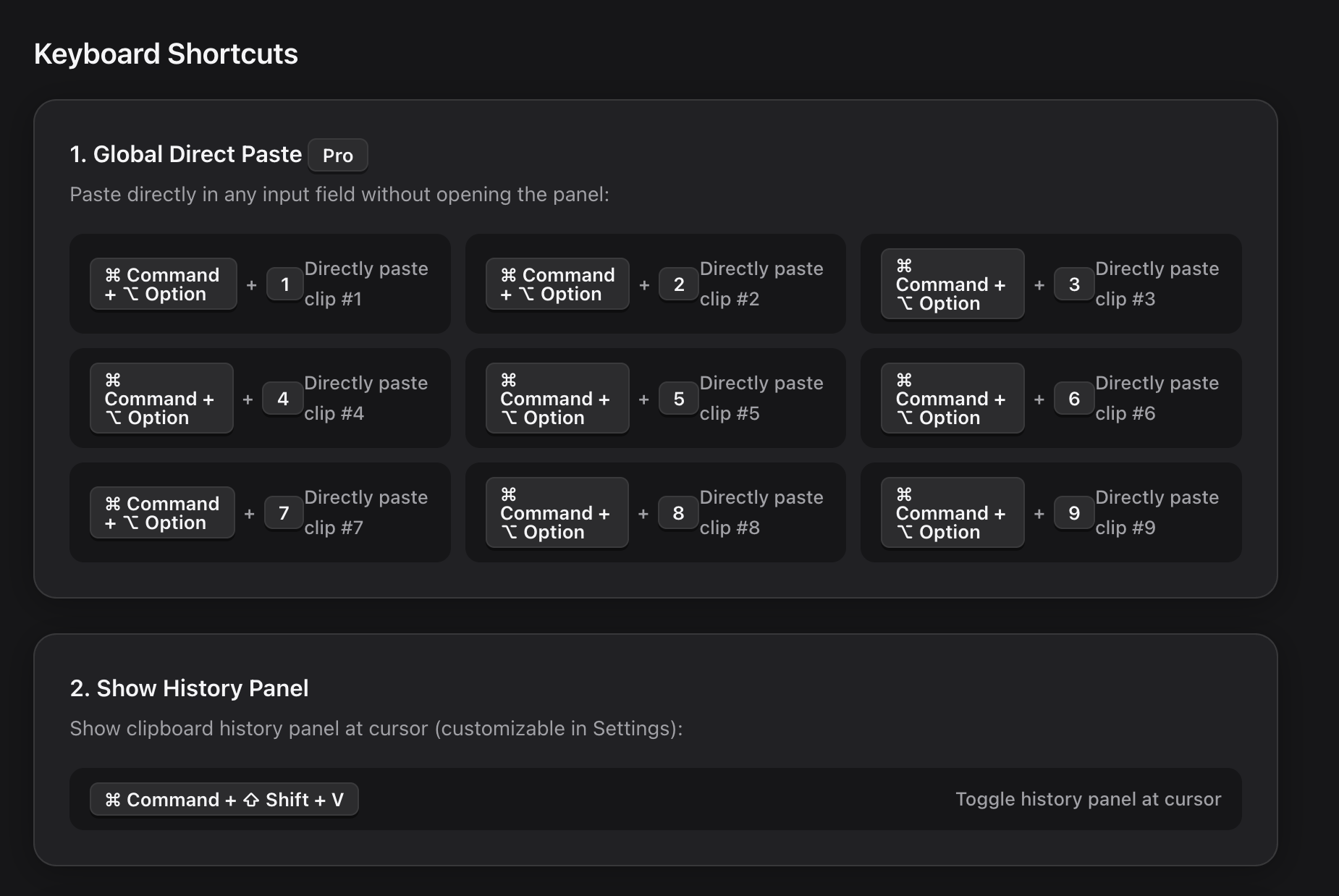
Copy and paste faster with hotkeys
Work without touching your mouse. EasyPaste lets you find and paste anything in seconds.
- ✓ ⌘ + ⇧ + V : Open clipboard history near your mouse cursor
- ✓ ⌘ + ⌥ + [1~9] : Paste recent 1st to 9th clips directly into your app
- ✓ ⌘ + P : Pin or unpin the selected clip to keep it at top
- ✓ ↑ / ↓ Arrow keys : Move up and down to preview items
- ✓ Enter / Return : Paste selected item into the front application
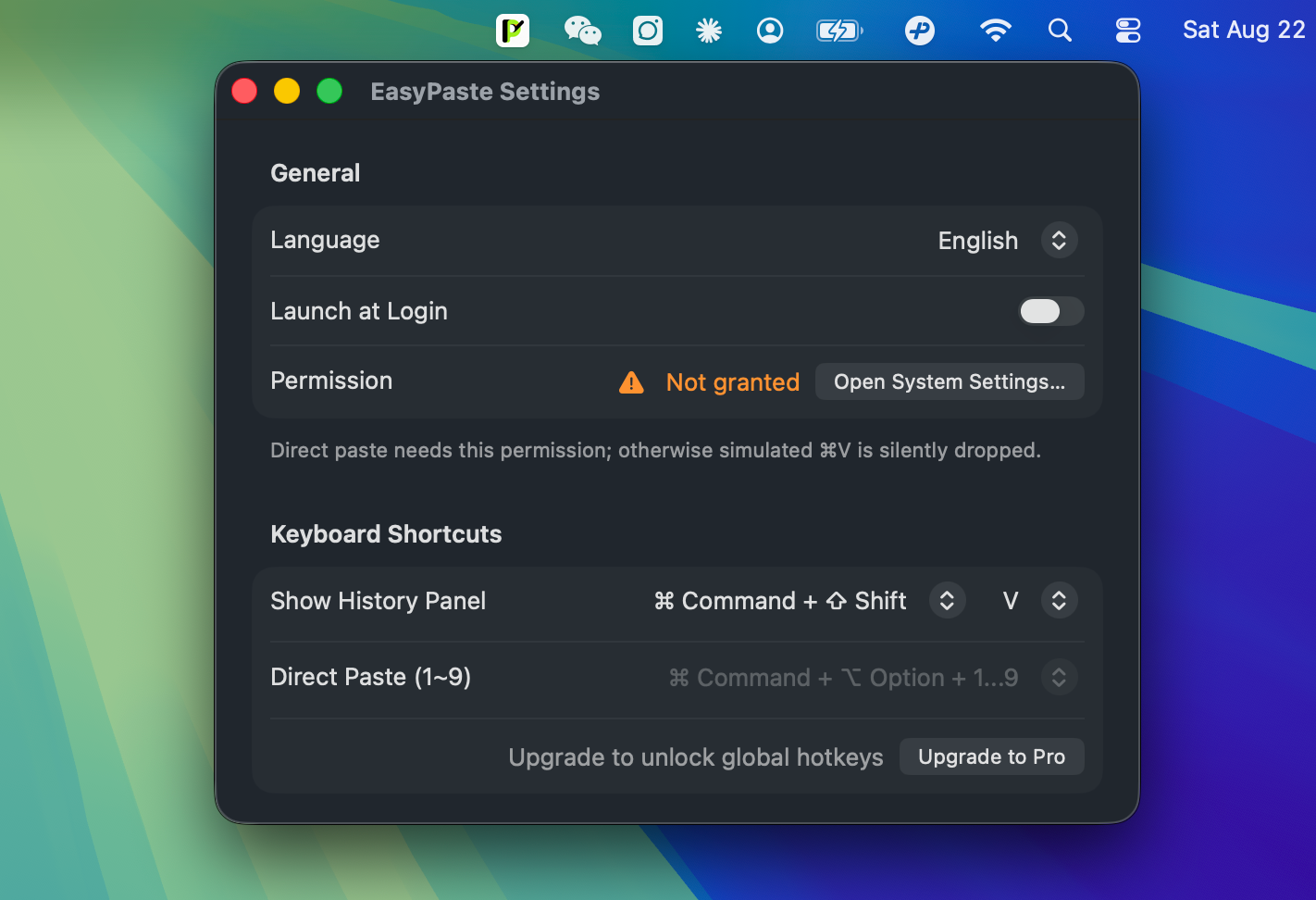
Customize EasyPaste for your workflow
Set your preferred hotkeys, auto-start on boot, and choose between English and Chinese.
- ✓ Custom Hotkeys: Set your own hotkeys for opening panel and quick paste
- ✓ Launch at Login: Automatically start in background when your Mac boots
- ✓ English & Chinese: Switch languages easily with one click
- ✓ Clear History: Delete all clipboard records with one click
Simple license, use on up to 3 Macs
Unlock fast global hotkeys and all future updates with a single license key.
- ✓ Up to 3 Macs: Use on your home and work Mac computers
- ✓ Instant License: Receive your Gumroad license key right after payment
- ✓ Menu Bar Icon: Quick access to settings and clipboard tools
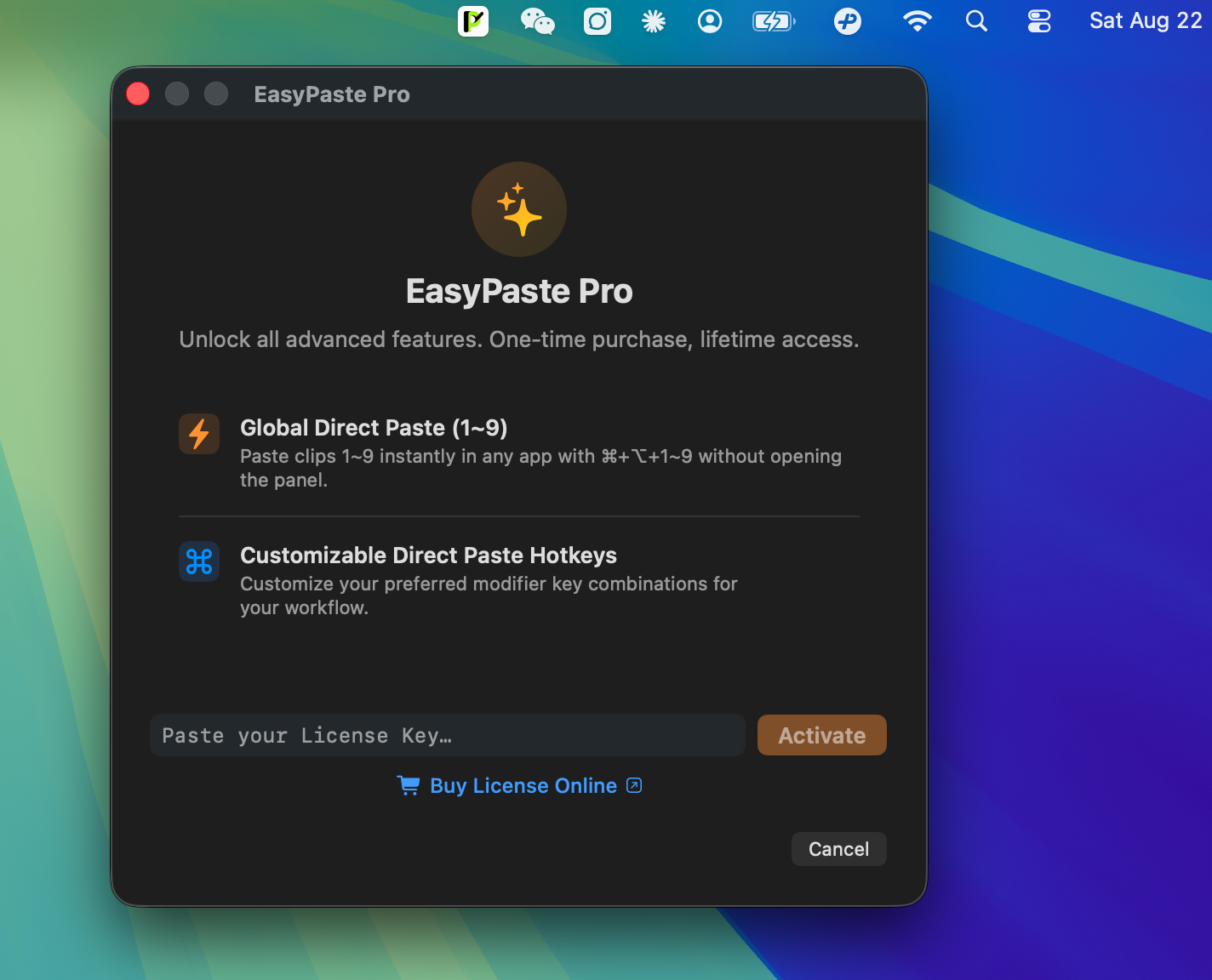
Get Started in 3 Minutes
Follow these simple steps to configure permissions and start using hotkeys.
One-Time Payment, Lifetime Access
No subscriptions. Buy once, use forever on up to 3 Mac computers.
- ✓ Unlock Direct Paste Hotkeys (⌘+⌥+1~9)
- ✓ Customizable Prefix Hotkeys
- ✓ Free Minor & Major Updates Forever
- ✓ Instant License Key Delivery by Email
- ✓ 14-day 100% Money-Back Guarantee
Frequently Asked Questions
Common questions about EasyPaste features, license keys, and privacy.
What makes EasyPaste different from Paste or Maccy?
EasyPaste is lightweight (<15MB RAM) and lets you paste recent items directly using Direct Paste (⌘+⌥+1~9) without opening any popup window. It is built natively for Mac with zero background lag.
Can I pin my favorite clips permanently?
Yes! Select any clip and press ⌘ + P, click the pin icon badge, or right-click to choose Pin. Pinned items stay at the top and will never be deleted by the history limit.
Does EasyPaste support Apple Silicon (M1/M2/M3/M4) and Intel Macs?
Yes. EasyPaste runs natively on all Apple Silicon chips (M1, M2, M3, M4) and Intel Mac computers running macOS 13.0 (Ventura) or newer.
Is my copied data private and safe?
Yes, 100% safe. EasyPaste works completely offline. Your copied data is never uploaded to any server or internet service. You can also hide passwords from apps like 1Password and Apple Keychain.
How do I activate EasyPaste Pro?
After buying on Gumroad, you will receive a License Key by email. In EasyPaste, open Settings -> click "Upgrade to Pro" -> paste your key and click "Activate".
How many Mac computers can I use with one license?
One license key can be activated on up to 3 Mac computers that you own. You can also deactivate an old Mac anytime to move your license to a new Mac.
What is the refund policy?
We provide a 14-day 100% money-back guarantee. If EasyPaste does not meet your needs, contact us on Gumroad for a full refund.